


As I previously reported back in September 2020, Amazon has announced the start of the roll out an OTA update to bring HomeKit Secure Router to both the Eero 6 and the Eero Pro 6. These updates will be available Eero app and will be the first HomeKit Wi-Fi 6 routers available on the market.
The standard Eero 6 offers one of each of the two bands.The Eero Pro 6 is also a tri-band router, offering two 5GHz bands and a single band which is 2.4GHz. Both the Eero 6 and Eero Pro 6 feature two Ethernet ports and a USB-C port. Both devices also support Zigbee, but this only works with devices controlled via Amazon Alexa.
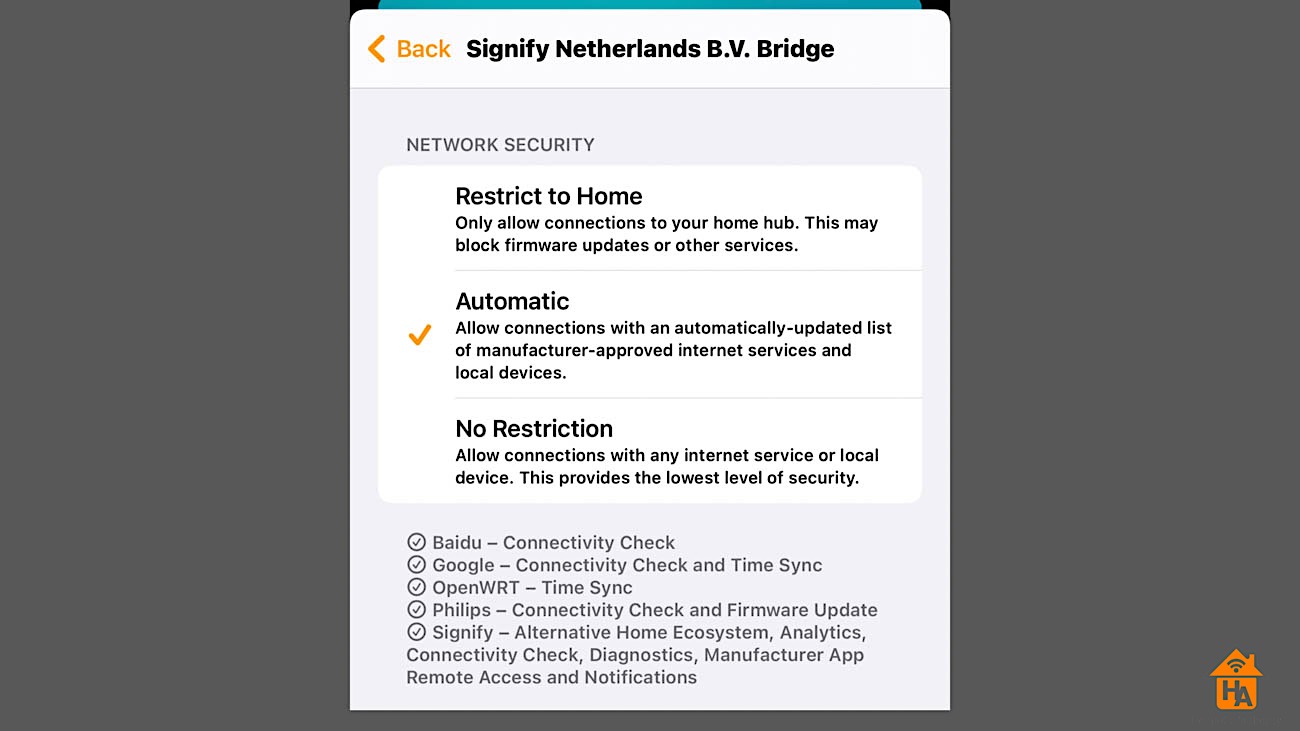
Home Secure Routers allow for more robust control of HomeKit accessories in your home. With the following options available depending on preference.
- Restrict to Home provides the tightest control over devices. This setting deny’s access to the web or other devices on your network. Devices set to ‘Restrict to Home’ can still connect to your HomeKit hub on your local network. But because they cannot communicate outside your network, they won’t be able to do things like update their firmware. If you run multiple smart home platforms like Google or Alexa, these devices cannot communicate with them.
- Automatic, which is the default setting for any accessory connected. This setting allows Internet connections and connections to other devices that have been identified by the device manufacturer. It describes those connections in the Home app providing additional transparency about services the device will connect. However, not all devices makers provide this information.
- No Restriction, which allows any connection to the Internet or a local device.

In terms of price, the Eero 6 system starts at $129.99, while Eero Pro 6 starts at $229.99. The Eero 6 extended retails for $89.99 each. All three devices are available to order from Amazon.
If you have a question or a comment, then leave it below. You can also follow us on Twitter, Facebook, YouTube and Instagram.



to anyone have eero routers….
I was having problem to activate HomeKit router in the eero. I contact the support to help me. I exchange couples email. and yesterday he was asking me my device Mac address, I give to him, I think was strange because why he want Mac address. today my router reboot 2 time and right after I received email telling me he change my router setting and tell me to try activate HomeKit router. I was shocked he can access my router and see and make change in the settings. and he didn’t ask me for permission to do so, and no system to block to any support personal to get access to any router all over the word. this router going back.